The workspace.
A real Mac in the cloud.
Models are good at writing code. Turning that code into working software takes an environment. JY Code gives your agent macOS, with the tools Apple, web, and backend projects depend on.
- Operating system
- macOS · arm64
- Where it runs
- Dedicated cloud session
- Interfaces
- Terminal · Desktop · Browser
- Built for
- Apple, web & backend projects
- Availability
- Private beta
INSIDE THE WORKSPACE / 3 INTERFACES
Desktop, browser & shell
in one session.
A terminal alone cannot inspect an iPhone sheet or a Safari layer tree. Your agent moves fluidly across native GUI apps, browsers, and Unix tools on the same cloud Mac.
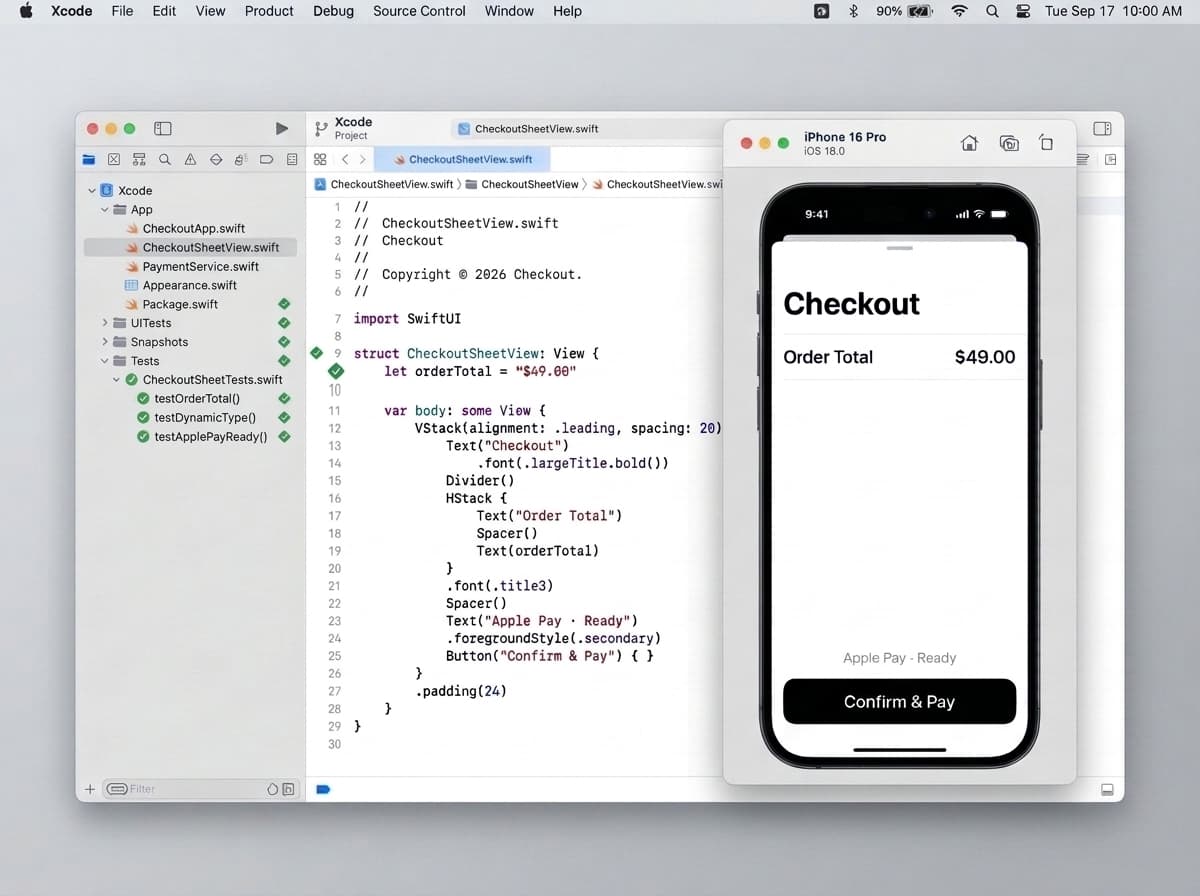
01 / DESKTOP + SIMCTL
Compile Swift, boot an iPhone, and inspect the screen.
Your agent drives xcodebuild and xcrun simctl together—running unit tests, booting target device bezels, and checking Dynamic Type or layout regressions visually.
$ xcodebuild -scheme PayApp -destination 'platform=iOS Simulator,name=iPhone 16 Pro' test- Xcode 16, Swift 6 & SwiftPM
- Booted iPhone & iPad Simulators
- XCTest & visual screenshot diffs
ANATOMY / 4 LAYERS
What sits
under a session.
Select a layer to see what it does. The model is only the top of the stack. Everything below is what lets its work actually run.
LAYER 02
Developer tools
Build systems, package managers, simulators, and browsers. This is the layer that compiles, runs, and checks a change, not just proposes one.
- Build systems
- Package managers
- Simulators
- Browsers
TOOLCHAIN / DESIGNED FOR
The tools your project
already expects.
The workspace is being designed around these tools. We will publish the exact versions with beta access.
Apple platforms
NATIVE- Xcode & xcodebuild
- Swift 6 & SwiftPM
- SwiftUI & AppKit
- iOS & iPadOS Simulator
- XCTest & Swift Testing
- Instruments (xctrace)
Web & browsers
BROWSER- Desktop Safari (WebKit)
- Chromium & Firefox
- Node.js, Bun & pnpm
- Playwright & Vite
- Web Inspector CLI
Languages & backend
SERVICES- TypeScript & Go
- Rust (cargo) & C/C++
- Python (uv & pytest)
- SQLite & Postgres client
- Protobuf & OpenAPI
Shell & packaging
TERMINAL- zsh & POSIX utilities
- Homebrew & ripgrep
- git & GitHub CLI (gh)
- codesign & otool
- Make & Just
SESSION BOUNDARIES / ISOLATION
Clean checkout.
Scoped access.
Delegating build and test execution only works when workspaces stay predictable, isolated, and auditable.
- 01
Clean working tree per task
Each session checks out your target branch in an isolated workspace, so parallel tasks never collide over ports, lockfiles, or DerivedData.
- 02
Live WindowServer, not headless-only
Native macOS apps, menu bar popovers, iOS Simulator bezels, and Safari windows actually launch and render frames for inspection.
- 03
Scoped environment & secrets
Build tokens and test credentials stay scoped to the workspace environment rather than hardcoded in prompts or echoed into summaries.
- 04
Reviewable handoff, clean teardown
Diffs, command logs, and screenshots are packaged for your review while temporary build caches and simulator state are discarded afterward.
PROJECT FIT / WHY MACOS
Where a Mac makes
the difference.
| Project | Why it matters | macOS |
|---|---|---|
| iOS & iPadOS apps | Xcode, SwiftUI previews, and the iOS Simulator require macOS, so building and visually checking an app happens natively. | Requires macOS |
| macOS desktop & menu bar apps | AppKit views, NSPopover windows, Keychain integration, and Instruments leak traces must run on the platform they ship to. | Requires macOS |
| Web apps & design systems | Desktop Safari runs on macOS, making it the reliable place to reproduce WebKit-only layout, font, and overscroll bugs. | Benefits from macOS |
| CLIs, SDKs & polyglot services | Teams developing on Apple Silicon Macs keep the agent's arm64 binaries, Homebrew formulas, and shell scripts identical to their own. | Benefits from macOS |
DIVISION OF WORK / YOU × THE MAC
You decide.
The Mac does the work.
YOU
- Describe the goal and architectural constraints
- Choose one model or route specialists per step
- Inspect the diff, test logs, and Mac screenshots
- Decide what merges to your repository
THE CLOUD MAC
- Index files, git history, and build targets
- Compile code and run native & browser test suites
- Boot iOS Simulator, Safari, and Instruments
- Package diffs, exit codes, and visual proof